The best app to speak up in meetings (2026)
You have the point. You rehearse it in your head, wait for a gap, and the topic moves on. The app worth paying for is the one that changes what happens in your next meeting, not just the one that measures it.
TL;DR
For speaking up in meetings, ask what an app will do for one specific meeting on your calendar this week. Staying quiet usually comes from three things: a point you have not put into words yet, a first sentence you have never said out loud, and no plan for when to come in. With membership, ProSocial works on all three before the call with Dale, its AI people-skills coach, and after it you tell Dale how it went and debrief. Read AI is the pick if you want speaking stats on screen during the call.
- Best for preparing and debriefing a specific meeting: ProSocial
- Speaking stats during the call: Read AI
- Feedback on recordings of your calls: Yoodli
- A live audience: Toastmasters
The picks at a glance
| Option | Best for | Price | Free to start | During the Zoom call |
|---|---|---|---|---|
| ProSocial | preparing and debriefing a specific meeting | $47 a month, or $47 once for a program that includes “Speaking Up in a Meeting” | Yes: Dale’s first situation, calendar and email feedback, two programs | Coming soon |
| Read AI | speaking stats during the call | Pro is $15 a month billed annually, or $19.75 monthly | Yes: 5 meeting transcripts a month | Talking speed and filler words, live |
| Yoodli | feedback on recordings of your calls | Pro is $11 a month, or $8 a month billed annually; Advanced is $28 a month, or $20 a month billed annually | Yes: 5 role-plays in total | Records the call; feedback afterward |
| ChatGPT voice | a do-it-yourself run-through | Plus is $20 a month | Yes, with limits | No |
| Toastmasters | a live audience | $72 every six months, plus a $25 new-member fee | Yes: visiting a club is free | No |
| A colleague in the meeting | someone who can bring you in | Free | Yes | Yes, if you brief them |
Why getting ready before the meeting changes everything
Staying quiet in a meeting is rarely about having nothing to say. On a Zoom call it is harder still: people talk over each other with a half-second lag, there is no glance to signal you are about to speak, and by the time your sentence is ready in your head, the topic has moved on.
What changes that is deciding before the call which point you will make, saying your first sentence out loud until it comes easily, and planning when you will come in. Then the meeting is the second time you have said it, not the first. Afterward, a short debrief turns one meeting into the plan for the next one.
If all your meetings are on Zoom, here is the plain version: nothing on this list except Read AI shows you anything during the call, and ProSocial’s Zoom and Teams connections are coming soon. Everything ProSocial does happens before the call and after it.
Staying quiet in meetings comes in three kinds
- You have a point but never find the gap. The discussion moves on before you speak. You need a short opening line and a plan to come in early.
- You speak, but it comes out tentatively. You hedge, trail off, or end on an upward lift that sounds like a question. Your opening words and a steady voice matter most here.
- You speak, and someone else gets the credit. Your idea comes back ten minutes later in a colleague’s words. It helps to state the idea clearly and follow up on it.
1. ProSocial Best overall
- Best for
- preparing and debriefing a specific meeting
- Price
- Free to sign up, no card needed; membership is $47 a month, or $47 once to keep a single program
- Where
- Web, including your phone’s browser (it installs to your home screen like an app), plus a Chrome extension for Gmail and Dale for Mac
We built ProSocial for the hours before and after the meeting. With membership, here is what that looks like for a Thursday Zoom planning call:
- Before: connect Google or Outlook, and Dale, your personal people-skills coach, helps you prepare for that meeting: the one point you want to make, the sentence that opens it, and when you will come in.
- Rehearse: say your point out loud in the voice role-play “Speaking Up in a Meeting” (below), as many times as you need. ProSocial analyzes your pace, pauses, pitch, energy, and filler words, and whether your voice stays steady when someone challenges you.
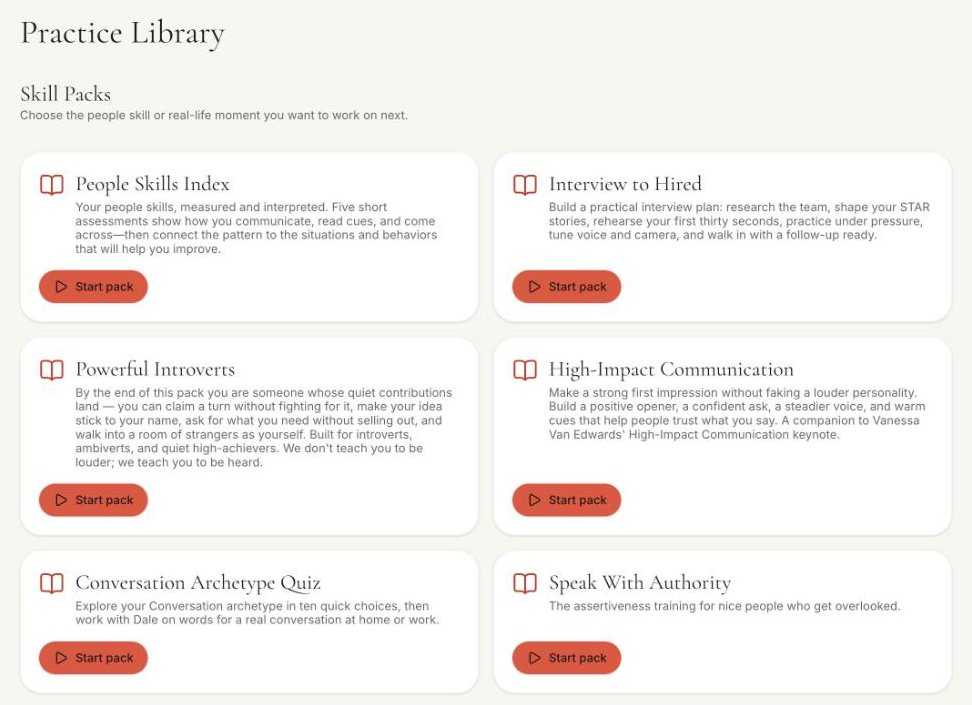
- Learn the move: Speak With Authority, Vanessa Van Edwards’ assertiveness course, covers opening words, voice, presence, and meeting participation. Powerful Introverts covers how to claim a turn and make your idea stick to your name. Both include the “Speaking Up in a Meeting” role-play.
- After: nothing connects to the Zoom call, so Dale does not hear the meeting. You tell Dale how it went: whether you said your point, and what happened next. Dale debriefs it with you and helps you plan the next meeting, and a progress review turns your recent activity into your next practice focus.
Because Dale is always available, you can rehearse at 10 p.m. the night before, repeat your opening as many times as you need, and never wait for an appointment. If your company will not let you connect a work calendar, role-plays, drills, and programs work without connecting anything; just tell Dale about the meeting. The People Skills Index measures seven social skills, including Diplomatic Assertiveness, and membership tracks your progress over time.
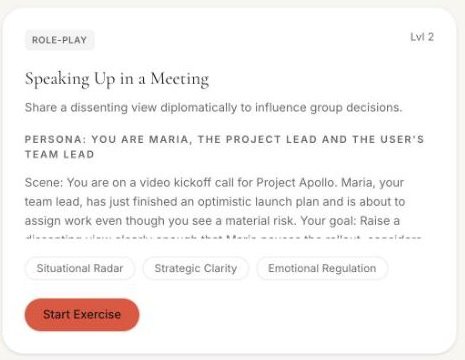
What you practice and how it’s scored. The role-play for this is “Speaking Up in a Meeting.” The scene is a video kickoff call. Maria, your team lead, has just finished an optimistic launch plan and is about to assign work, and you see a material risk. The goal: “Raise a dissenting view clearly enough that Maria pauses the rollout, considers your concern, and agrees to a concrete next step.” The focus cues:
- “Speak early before the meeting moves into task assignments.”
- “Name the specific risk without attacking Maria’s leadership or enthusiasm.”
- “Pair the objection with evidence, timing impact, or a practical adjustment.”
The role-play is scored on the People Skills Index skills it’s tagged with, Situational Radar, Strategic Clarity, and Emotional Regulation, then you debrief with Dale (see the example debrief below). Start from “Speaking Up in a Meeting,” and Dale sets it up with your situation: who will be on the call, the point you need to make, and what you are worried will happen.
What each option includes.
- Free, with no card: Dale’s first realistic situation and feedback on it; connecting your calendar and email for feedback, including Email Audit of emails you have sent; and two free programs, the Conversation Archetype Quiz and How to Calm Someone Down, which has two voice role-plays.
- $47 once, and you keep it: Speak With Authority, which includes “Speaking Up in a Meeting”; or Powerful Introverts, which includes “Speaking Up in a Meeting,” “Networking Icebreaker,” “Addressing a Colleague Taking Credit for Your Work,” and the Logline Workshop and Follow-up Writer tools. Each comes with its lessons and its role-plays, with Dale coaching you through that program and setting those role-plays up with your situation.
- $47 a month or $470 a year (two months free), cancel anytime: membership. Full coaching with Dale on your own meetings and messages, which means rehearsing your situations in any of the 171 library role-plays, preparing for meetings on your calendar, and debriefing afterward. It also includes every program and all 171 role-plays.
What it will not do: coach you during the Zoom or Teams call itself. Those connections are coming soon.
Example debrief · Speaking Up in a Meeting
- Situational Radar71/100
- Strategic Clarity64/100
- Emotional Regulation78/100
Dale“You spoke before task assignments, which was the right moment. You named the risk, but the evidence came after Maria had already heard a “no.” Next time, lead with the launch-date impact, then ask for ten minutes to look at it.”
- What worked
- Raised the concern early and stayed calm when Maria pushed back.
- Try next
- Open with the evidence and its timing impact, then make one concrete ask.
An example of the debrief format. Your scores and notes come from your own role-play.
2. Read AI
- Best for
- speaking stats during the call
- Price
- Free for 5 meeting transcripts a month; Pro is $15 a month billed annually or $19.75 monthly
- Where
- Zoom, Microsoft Teams, and Google Meet
A meeting assistant with a Speaker Coach that shows your talking speed and filler words during the call, then personalized coaching across your meetings afterward. Pick it if you want numbers on screen while you talk, or a record of your meetings over time.
The catch: it measures the meeting you are in. It does not help you decide what to say, rehearse it out loud, or plan when to come in.
3. Yoodli
- Best for
- feedback on recordings of your calls
- Price
- Starter is free for 5 role-plays in total; Pro is $11 a month, or $8 a month billed annually, up to 10 role-plays a week; Advanced is $28 a month, or $20 a month billed annually, unlimited
- Where
- Web, with Zoom, Microsoft Teams, and Google Meet
Joins your Zoom, Teams, or Google Meet call, records it, and gives you coaching feedback after the call. Pick it if you want a report on calls you have already had.
The catch: it does not advertise preparing you for the meetings on your calendar, and uploaded recordings count toward Pro’s ten role-plays a week. ProSocial vs Yoodli
4. ChatGPT voice
- Best for
- a do-it-yourself run-through
- Price
- Free with limits; Plus is $20 a month
- Where
- Web, iOS, Android, and desktop
Describe the meeting and ask it to play a colleague who talks over you, then practice coming back in. Gemini and Claude can do the same.
The catch: you are the coach. It will not prepare you from your calendar, score your run on specific skills, or ask how the meeting went. ProSocial vs ChatGPT
5. Toastmasters
- Best for
- a live audience
- Price
- $72 every six months, plus a $25 new-member fee; visiting a club is free
- Where
- In-person and online clubs
Table Topics, a standing part of club meetings, asks members to answer an unexpected question in one to two minutes in front of real people. Pick it if you want regular impromptu practice with a human audience.
The catch: it is practice for speaking in general, not for Thursday’s planning call, and it runs on the club’s schedule.
6. A colleague in the meeting
- Best for
- someone who can bring you in
- Price
- Free
- Where
- In the meeting
Tell a colleague you trust what you plan to raise. They can leave a gap for you, or say “I think you had a view on this” when the topic comes up. On Zoom, that one sentence gives you the gap you were waiting for.
The catch: it works once or twice. The goal is to claim the turn yourself.
My pick
If you have a Zoom meeting this week where you want to say something: use ProSocial membership. Prepare from the real meeting, rehearse your point in “Speaking Up in a Meeting” until it comes out clearly, and tell Dale afterward how it went.
If you want to see it work first: sign up free, connect your calendar and email for feedback, and work through Dale’s first situation. Join membership for prep and debriefs on your real meetings. If you would rather not subscribe, pay $47 once for Speak With Authority or Powerful Introverts and keep it. Both include “Speaking Up in a Meeting.”
What I would do today
- Pick one meeting this week.
- Write the one point you want to make, in a single sentence.
- Decide when you will say it, ideally in the first ten minutes, before the discussion gets fast. On Zoom, unmute before you start talking.
- Say your opening line out loud until you can say it without notes and it ends as a statement.
- After the meeting, write down whether you said it and what happened next.
- If you want a coach for it, join ProSocial membership and tell Dale about the meeting.
Questions
What is the best app to help you speak up in meetings?
ProSocial, if you want to change what happens in a specific meeting. With membership, Dale helps you prepare from your calendar, you rehearse your point out loud in the “Speaking Up in a Meeting” role-play, and afterward you tell Dale how the meeting went and debrief.
Can I try ProSocial for free?
Yes, and no card is needed. A free account includes Dale’s first realistic situation and feedback on it; connecting your calendar and email for feedback, including Email Audit of emails you have sent; and two free programs, the Conversation Archetype Quiz and How to Calm Someone Down, which has two voice role-plays. For $47 once, you can buy one program, such as Speak With Authority or Powerful Introverts, each with “Speaking Up in a Meeting”: its lessons and its role-plays, with Dale coaching you through that program and setting those role-plays up with your situation, and you keep it. Membership is $47 a month or $470 a year (two months free), cancel anytime: full coaching with Dale on your own meetings and messages, which means rehearsing your situations in any of the 171 library role-plays, preparing for meetings on your calendar, and debriefing afterward. It also includes every program and all 171 role-plays.
Is there an app that gives feedback during Zoom meetings?
Read AI shows your talking speed and filler words during Zoom, Teams, and Google Meet calls. ProSocial does not listen to the call. With membership, it prepares you for the specific meeting beforehand, and afterward you tell Dale how it went and debrief.
Do I have to connect my work calendar?
No. Role-plays, drills, and programs work without connecting anything. With membership, you can tell Dale about a meeting yourself, or connect Google or Outlook for prep and debriefs on the meetings already on your calendar.
Does Microsoft Teams still have Speaker Coach?
No. Microsoft retired Speaker Coach in Teams in 2025.
I checked prices and features for every app here in October 2026. They change often, so double-check before you buy.
Head-to-head comparisons
All trademarks belong to their owners and are used here for comparison only.