The best app to practice presentations (2026)
Your slides are fine. The hard part comes when leadership starts asking about the numbers: the question you did not expect, or the executive who is not convinced. Practice the delivery and the questions.
TL;DR
Ask two things of any presentation tool: will it give you specific feedback on your delivery, and will it let you practice answering tough questions out loud? Several apps do one or the other. ProSocial does both in one place. With membership, you get feedback on your voice and expressions, then rehearse the questions in Pitching a High-Impact Idea, where Rebecca, VP of Operations, presses you on benefits, risks, and resources. Dale, your AI people-skills coach, sets it up for your real presentation, such as a quarterly results review, and the role-play is scored on the skills it builds before you debrief with Dale.
- Best for delivery plus tough questions: ProSocial
- Help inside PowerPoint: Speaker Coach
- Feedback after video calls: Yoodli
- Live practice with real people: Ultraspeaking
The picks at a glance
| App | Best for | Price | Practicing tough questions |
|---|---|---|---|
| ProSocial | delivery plus tough questions | Free to sign up, no card; $47 a month, or $47 once for one program you keep | Library voice role-plays, scored, with a debrief |
| Speaker Coach in PowerPoint | help inside PowerPoint | Free preview in PowerPoint for the web | Delivery feedback only |
| ChatGPT voice | a do-it-yourself Q&A run-through | Free with limits; Plus is $20 a month | From what you describe |
| Yoodli | feedback after video calls | Free for 5 role-plays in total; Pro $11 a month, or $8 a month billed annually; Advanced $28 a month, or $20 a month billed annually | In role-plays |
| VirtualSpeech | practicing in VR | $45 a month or $399 a year | In its role-plays |
| Ultraspeaking | live practice with real people | Free app; live classes from $99 a month | Live, with a coach and other learners |
Why tough questions change everything
You can rehearse a presentation until every slide is smooth and still lose it in the first question. Someone asks why the number on slide four is lower than last quarter, and the calm voice you practiced is gone.
Delivery feedback cannot prepare you for that, because a screen does not interrupt you. Practicing the questions does. You rehearse the talk, then rehearse the five minutes after it: the skeptical question about the numbers, the request to skip ahead, the “I am not convinced.” You walk in having already answered them out loud.
Presentations come in three kinds
- The results update to leadership. Short, often interrupted, with questions about the numbers halfway through slide two. Your first sentence and your answers matter more than your slides.
- The pitch or proposal. You want a decision, and someone will push back on cost, risk, or timing. Rehearse the objections as carefully as the pitch.
- The talk to a large audience. Delivery carries more weight here: your voice, your pace, your face, and your hands. Questions usually come at the end.
1. ProSocial Best overall
- Best for
- delivery plus tough questions
- Price
- Free to sign up, no card needed; membership is $47 a month, or $47 once for one program you keep
- Where
- Web (installs to your phone’s home screen like an app), Telegram, a Chrome extension for Gmail, and Dale for Mac
We built ProSocial so you can practice the talk and the questions that follow it. With membership, record a run-through for video expression analysis; in role-plays, voice analysis covers your pace, pauses, pitch, energy, and filler words. Cue Mirror is a live check on your own camera of your smile, nod, open hands, and steeple before you present.
Then rehearse the part after the slides. The library has 171 voice role-plays, each with a counterpart, a scene, a stated goal, and focus cues. With membership, start from the closest one, and Dale, your personal people-skills coach, sets it up with your situation: who will be there, what you need from them, and which questions about your numbers you are worried about. You can run the hardest moment ten times the night before and never wait for an appointment. If the presentation is a meeting on your Google or Outlook calendar, Dale helps you prepare and debriefs with you afterward.
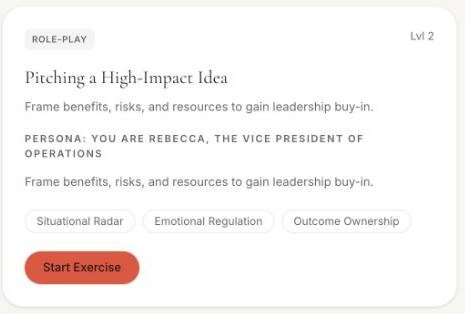
What you practice and how it’s scored. For a quarterly results review with leadership, start from Pitching a High-Impact Idea. Rebecca, VP of Operations, weighs your case, and the scenario is described as: “Frame benefits, risks, and resources to gain leadership buy-in.” A results review asks the same things: what the numbers mean, what is at risk, and what you need next. Dale sets it up for your review: who will be in the meeting, the numbers they are likely to press on, and the question you dread.
- Scored on the People Skills Index skills it’s tagged with: Situational Radar, Emotional Regulation, and Outcome Ownership.
- Then a debrief with Dale, which also covers how you sounded, including whether your voice stayed steady when Rebecca pushed back.
See the example debrief on this page for what you get back after a run.
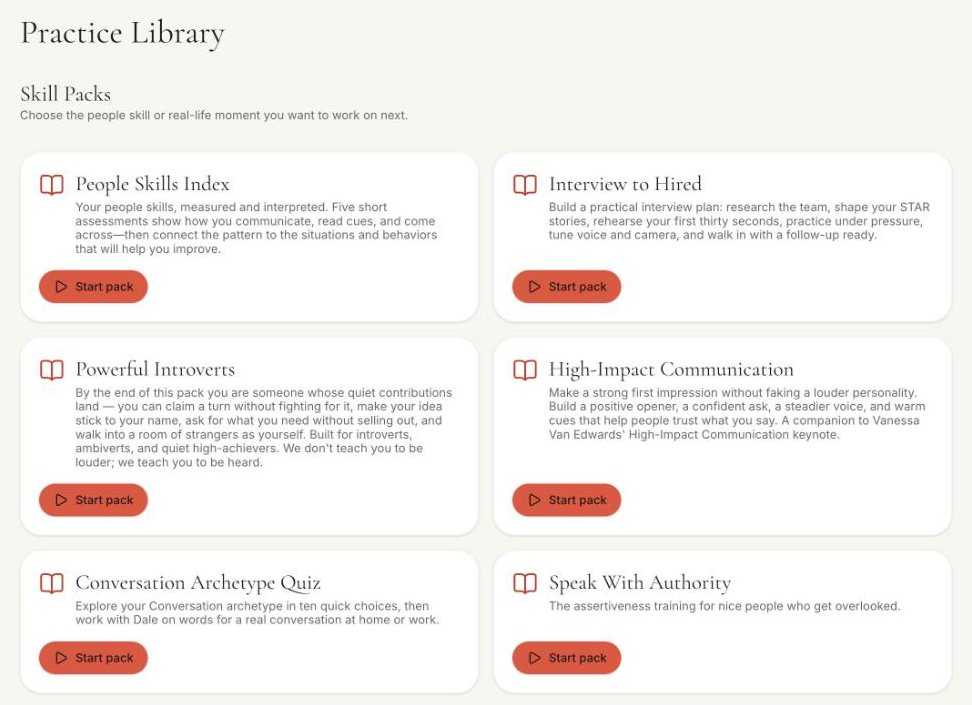
What free and $47 get you. Free, with no card: Dale’s first realistic situation and feedback on it; connecting your calendar and email for feedback, including Email Audit of emails you have sent; and two free programs, the Conversation Archetype Quiz and How to Calm Someone Down, which has two voice role-plays. Membership is $47 a month or $470 a year (two months free), cancel anytime: full coaching with Dale on your own meetings and messages, which means rehearsing your situations in any of the 171 library role-plays, preparing for meetings on your calendar, and debriefing afterward. It also includes every program and all 171 role-plays, including Pitching a High-Impact Idea, plus video expression analysis. If you would rather pay once, $47 buys one program: its lessons and its role-plays, with Dale coaching you through that program and setting those role-plays up with your situation, and you keep it. For presenting, High-Impact Communication fits best: lessons on a positive opener, a steadier voice, and warm cues, plus the Charisma Quiz, a warm-opener role-play, a pressured-ask role-play, Charisma Coach, and Cue Mirror, with Dale coaching you through it and setting its role-plays up with your situation. Speak With Authority, Vanessa Van Edwards’ course on opening words, voice, presence, and meeting participation, includes the Speaking Up in a Meeting role-play.
What it will not do: give feedback inside PowerPoint, during a live Zoom or Teams presentation, or in VR. The Zoom and Teams connections are coming soon.
Example debrief · Pitching a High-Impact Idea
- Situational Radar67/100
- Emotional Regulation72/100
- Outcome Ownership60/100
Dale“Rebecca asked about risk twice before you answered it directly. Your benefits were clear, but the resources you needed came last. Lead with the decision you want, then the benefit, the main risk and how you will manage it, and what it takes.”
- What worked
- Clear benefit, explained in terms of Rebecca’s goals.
- Try next
- Answer the risk question the first time, and state the ask up front.
An example of the debrief format. Your scores and notes come from your own role-play.
2. Speaker Coach in PowerPoint
- Best for
- help inside PowerPoint
- Price
- Free preview in PowerPoint for the web, even without an Office subscription
- Where
- PowerPoint for the web, Windows, Mac, iOS, and Android tablets
Feedback while you rehearse your slide show on pacing, pitch, filler words, informal speech, and whether you are simply reading your slides, plus a report afterward. Pick it if you want feedback without leaving PowerPoint.
The catch: it works in English only, and nobody asks you a question when you finish.
3. ChatGPT voice
- Best for
- a do-it-yourself Q&A run-through
- Price
- Free with limits; Plus is $20 a month
- Where
- Web, iOS, Android, and desktop
Describe your results and your audience, and ask it to play a skeptical executive who questions the numbers, out loud. Because it works from whatever you paste in, it can ask about your actual figures. Gemini and Claude can do the same, and you can start tonight at no cost.
The catch: you are the coach. You write the questions, decide how hard it pushes, and judge your own answers, and there is no delivery report on your pace, pauses, or filler words.
4. Yoodli
- Best for
- feedback after video calls
- Price
- Starter is free for 5 role-plays in total; Pro is $11 a month, or $8 a month billed annually ($96 a year), up to 10 role-plays a week; Advanced is $28 a month, or $20 a month billed annually, unlimited
- Where
- Web, with Zoom, Microsoft Teams, and Google Meet
Practice a talk and get a delivery report, run role-plays, or have it join your Zoom, Teams, or Google Meet call as a participant and give coaching feedback after the call. Pick it if you present on video calls and want feedback afterward.
The catch: Pro caps you at ten role-plays a week, and uploaded recordings count toward that cap. ProSocial vs Yoodli
5. VirtualSpeech
- Best for
- practicing in VR
- Price
- $45 a month or $399 a year
- Where
- Browser, with optional VR on Meta Quest headsets
Present to a virtual audience, from a one-on-one pitch to a conference stage, with AI feedback afterward. The VR mode makes a big stage feel more real. Pick it if you want to practice in VR.
The catch: you pick from its scenarios, and it does not prepare you from your own calendar. Monthly, it costs about the same as ProSocial; its $399 annual plan is less than ProSocial’s $470 a year. ProSocial vs VirtualSpeech
6. Ultraspeaking
- Best for
- live practice with real people
- Price
- A free training app; live classes from $99 a month
- Where
- Its app, plus live online classes
Ultraspeaking sells help with exactly this kind of moment, including answering tough questions in meetings and presenting to executives. It offers a $99-a-month membership with daily live sessions, cohort courses ($1,995), and private one-on-one coaching, with feedback from coaches and other learners, plus speaking games in a free app. Pick it if you want to practice in front of real people.
The catch: membership starts at $99 a month, more than twice ProSocial’s, and live classes run at scheduled times rather than whenever you have a spare twenty minutes.
My pick
If you have a presentation coming up: use ProSocial. A month of membership covers it. Record a run-through and fix your delivery, then rehearse Pitching a High-Impact Idea, set up by Dale for your real audience, until your answers to the hard questions come out calmly.
ChatGPT voice plus Speaker Coach is a fair free pairing: ChatGPT can question your actual figures, and Speaker Coach reports on your pace and filler words inside PowerPoint. The gap is the moment you are worried about. Speaker Coach listens while you present alone, and ChatGPT asks the questions but does not report on your delivery, so neither tells you how you sounded when the hard question landed. In ProSocial that happens in one rehearsal: Rebecca presses, you answer, and the debrief covers whether your voice stayed steady, alongside your scores and Dale’s notes on what to change. Video expression analysis and Cue Mirror add feedback on your face and hands.
If you want to see how it feels first: sign up free tonight, no card needed, and work through Dale’s first situation. The presentation practice starts when you join or buy a program.
What I would do today
- Write the one sentence you want leadership to remember from your presentation.
- Give the whole presentation out loud once, and time it.
- Write down the three questions about your numbers you would least like to be asked.
- Answer each one out loud, then answer the follow-up: “I am still not convinced.”
- If you want a coach for it, join ProSocial membership and tell Dale about the presentation and who will be there.
Questions
What is the best app to practice presentations?
ProSocial, if you want to practice both your delivery and the questions afterward. With membership, you get feedback on your voice and expressions, then rehearse in voice role-plays such as Pitching a High-Impact Idea, scored on the skills each one builds, with a debrief from Dale.
Can I try ProSocial for free?
Yes, and no card is needed. A free account includes Dale’s first realistic situation and feedback on it; connecting your calendar and email for feedback, including Email Audit of emails you have sent; and two free programs, the Conversation Archetype Quiz and How to Calm Someone Down, which has two voice role-plays. For $47 once, you can buy one program, such as High-Impact Communication with Cue Mirror: its lessons and its role-plays, with Dale coaching you through that program and setting those role-plays up with your situation, and you keep it. Membership is $47 a month or $470 a year (two months free), cancel anytime: full coaching with Dale on your own meetings and messages, which means rehearsing your situations in any of the 171 library role-plays, preparing for meetings on your calendar, and debriefing afterward. It also includes every program and all 171 role-plays.
How much do presentation practice apps cost?
Speaker Coach is a free preview in PowerPoint for the web. ChatGPT is free with limits, or $20 a month for Plus. Yoodli is free for 5 role-plays, then Pro is $11 a month ($8 a month billed annually) and Advanced is $28 a month ($20 a month billed annually). ProSocial is free to sign up, then $47 a month, or $47 once for one program. VirtualSpeech is $45 a month or $399 a year, and Ultraspeaking’s live classes start at $99 a month.
How do I practice for questions after a presentation?
Write down the questions you are most worried about and answer them out loud, ideally with someone pushing back. In ProSocial, with membership, start from a role-play such as Pitching a High-Impact Idea, Dale sets it up with the questions you are worried about, you rehearse out loud, and it is scored on the skills it builds before you debrief with Dale.
What about Toastmasters?
Toastmasters clubs give you regular practice in front of a live group and spoken feedback from members, for $72 every six months plus a one-time $25 new-member fee. Meetings run on the club’s schedule, so they rarely line up with a specific presentation date.
I checked prices and features for every app here in October 2026. They change often, so double-check before you buy.
Head-to-head comparisons
All trademarks belong to their owners and are used here for comparison only.